
Riko is Tendify's built-in AI assistant. It helps you set up and improve your daily tender monitoring so you never miss a relevant opportunity. Think of Riko as your personal advisor for finding the right search phrases — the phrases Tendify uses every day to scan new tenders and surface the ones that matter to your business.
What can Riko do?
Recommend search phrases
Not sure what to search for? Just describe your business, tell Riko what kind of work you do, and it will suggest search phrases tailored to your company. Riko understands your company profile — your industry, keywords, and description — and uses that context to propose phrases that are likely to find relevant tenders.
You can say things like:
- "What phrases would you recommend for my company?"
- "We recently started offering IT consulting services, can you suggest phrases for that?"
- "Help me find tenders related to medical equipment supply"
Test phrases before you commit
Before adding a phrase to your daily monitoring, Riko tests it against a large database of past tenders. This shows you exactly what kind of results that phrase would produce — how many tenders it matches and how relevant they are.
This way, you can see whether a phrase is too broad (matching hundreds of unrelated tenders), too narrow (barely matching anything), or just right — all before it goes live.
Show real tender examples
Numbers alone don't tell the full story. Riko can pull up actual examples of past tenders that match your phrase, complete with titles, descriptions, contract types, and countries. You can review these examples yourself and judge whether the phrase is capturing the right kind of work.
These are always historical examples — they show what the phrase would have caught in the past, giving you a clear picture of what to expect from your daily monitoring going forward.
Manage your search phrases
Riko gives you full control over your active search phrases — the ones Tendify uses every day to find new tenders for you. You can:
- See all your current phrases: get a quick overview of what's active
- Add new phrases: once you've tested and validated a phrase, save it with one confirmation
- Update existing phrases: refine the wording to improve results
- Remove phrases: clean up phrases that are no longer relevant
Riko will always confirm with you before making any changes.
Remember your preferences
Riko learns from your conversations. If you tell it you're only interested in tenders from certain countries, prefer specific contract types, or want to avoid certain sectors — it remembers. These preferences carry over to future conversations, so Riko gets better at helping you over time.
Examples of things Riko remembers:
- Countries or regions you care about
- Contract types you prefer (services, supplies, works)
- Phrases that worked well or didn't
- Industries or sectors you want to focus on or exclude
How to talk to Riko
Riko is conversational — just type naturally. Here are some common ways to get started and get the most out of it.
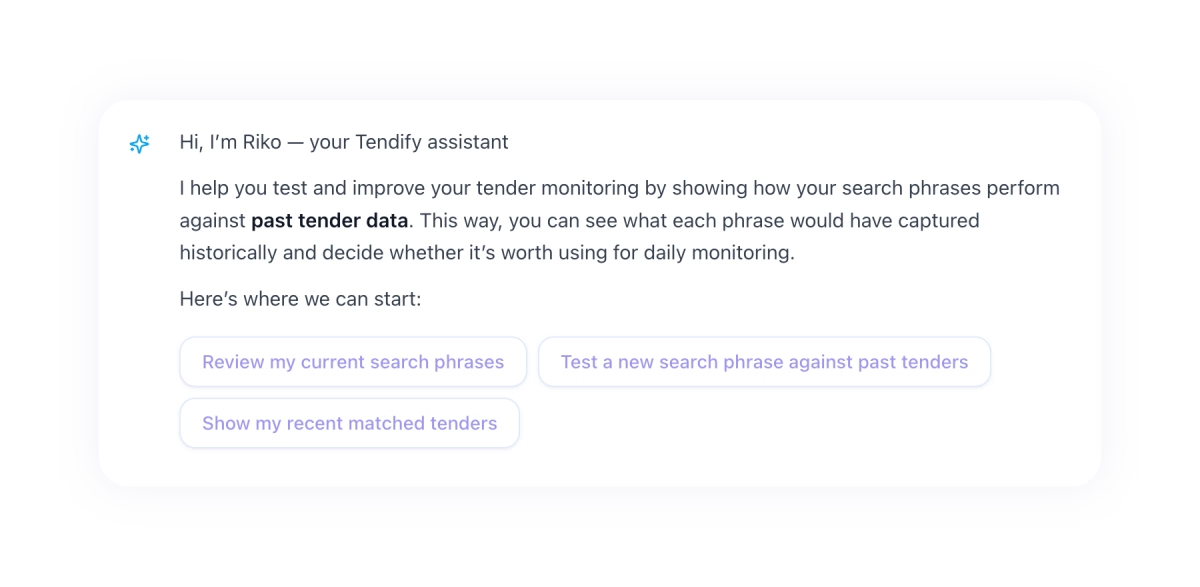
Starting a conversation
When you open a chat, Riko introduces itself and suggests relevant next steps based on your current setup. If you already have search phrases configured, it might suggest reviewing them or testing a new one. If you're starting fresh, it will offer to help you create your first phrases.
Asking for recommendations
"What search phrases would work for my company?"
Riko looks at your company profile and suggests phrases that match your capabilities. You can then test each suggestion to see how it performs before deciding to save it.
Testing a search phrase
"Test the phrase: Provision of cybersecurity consulting services"
Riko runs a multi-step analysis behind the scenes:
- It checks how the phrase performs against past tenders — how results are distributed across different quality levels
- It identifies the sweet spot where results are highly relevant
- It counts how many past tenders match at that quality level
- It presents the findings in plain language, e.g., "Based on historical data, this phrase matched 24 relevant tenders"
Viewing tender examples
"Show me examples of tenders this phrase would match"
Riko retrieves real past tenders and presents them with key details: title, description, contract type, country, and how closely they matched. Every example comes directly from the database — Riko never makes up tender data.
Saving a phrase
"That looks great, save it"
Once you're happy with a phrase's performance, Riko saves it to your active monitoring. From that point on, Tendify will use that phrase daily to scan for new tenders.
Refining and iterating
"The results are too broad — can we make it more specific?"
"What if we add 'for healthcare facilities' to the phrase?"
Riko is designed for back-and-forth. You can tweak phrases, re-test them, compare results, and iterate until you find the perfect wording.
Following suggested actions
At the end of every response, Riko suggests 2-4 relevant next steps — things like "Test another phrase", "Save this phrase", or "Review my current phrases". These action suggestions keep the conversation moving and make sure you always know what you can do next.
Good to know
Riko works with historical tenders
Everything Riko shows you is based on past tender data. It does not search for active or current tenders, and it cannot recommend specific tenders to bid on. The purpose is to test and refine your search phrases so your daily monitoring catches the right opportunities going forward.
Search phrases use "capability" syntax
Tendify works best when search phrases describe what your company does — your capabilities and deliverables. Think of it as how you would describe your services to a potential client.
Good examples:
- "Supply and installation of educational furniture"
- "Provision of IT infrastructure management services"
- "Execution of road construction and maintenance works"
Less effective:
- "The procurement of desks for schools" (too focused on the buyer's perspective)
- "Looking for construction tenders in Germany" (describes what you want, not what you do)
Riko will guide you toward this format if your phrasing needs adjustment.
Riko always validates before saving
Riko never blindly saves a search phrase. It will always analyze the phrase first, show you the expected results, and ask for your confirmation before adding it to your active monitoring. This ensures every phrase in your setup is intentional and effective.
Tips for getting the best results
- Start with what you do: Describe your core services or products. Riko will help translate that into effective search phrases.
- Be specific but not too narrow: A phrase like "Supply of medical imaging equipment" is better than "Supply of equipment" (too broad) or "Supply of Siemens MRI scanners model X" (too narrow).
- Test before you save: Always review the analysis and tender examples before committing a phrase to your daily monitoring.
- Iterate: If results aren't quite right, work with Riko to refine the wording. Small changes can make a big difference.
- Tell Riko your preferences: If you only care about tenders in certain countries or contract types, say so. Riko will remember and factor it into future conversations.
- Review periodically: As your business evolves, revisit your search phrases with Riko to make sure they still reflect what you offer.


